Microsoft Project 2013 Professional for Windows
Turn complex work into a schedule people can understand. Build Gantt plans, connect dependencies, manage resources, monitor cost and communicate progress with a proven perpetual desktop edition.


Important: confirm the intended PC before purchase
Microsoft's published historical installation requirements list Windows 7, Windows 8, Windows 8.1, Windows 10 and Windows Server 2008 R2. Windows 11 is not listed for Project Professional 2013. Because the product is out of support, successful installation on a modern or modified environment should never be assumed.




A project plan is more than a task list
A serious schedule must explain sequence, capacity, cost and consequence. Project 2013 Professional helps project managers model that whole system so stakeholders can see what happens next, what can slip and where intervention matters.

Build the schedule logic
Organise summary tasks and subtasks, add milestones, link dependencies, choose manual or automatic scheduling and calculate dates from the plan.

Trace cause and effect
Highlight a selected task's predecessors and successors to make a crowded Gantt chart easier to read and dependency conversations easier to lead.

Balance people and work
Assign work, material and cost resources; review utilisation; identify overallocations and make informed changes before pressure becomes delay.

Report without rebuilding the story
Create graphical reports inside Project, including dashboards and burndown views, then tailor colours, charts and content for the audience.

Track planned versus actual
Set baselines, update actual progress and compare the current plan with the approved position to reveal schedule and cost variance.

Extend into enterprise PPM
Professional can connect to a compatible, separately deployed Project Server environment for central projects, resources and governance.
Make the delivery path visible
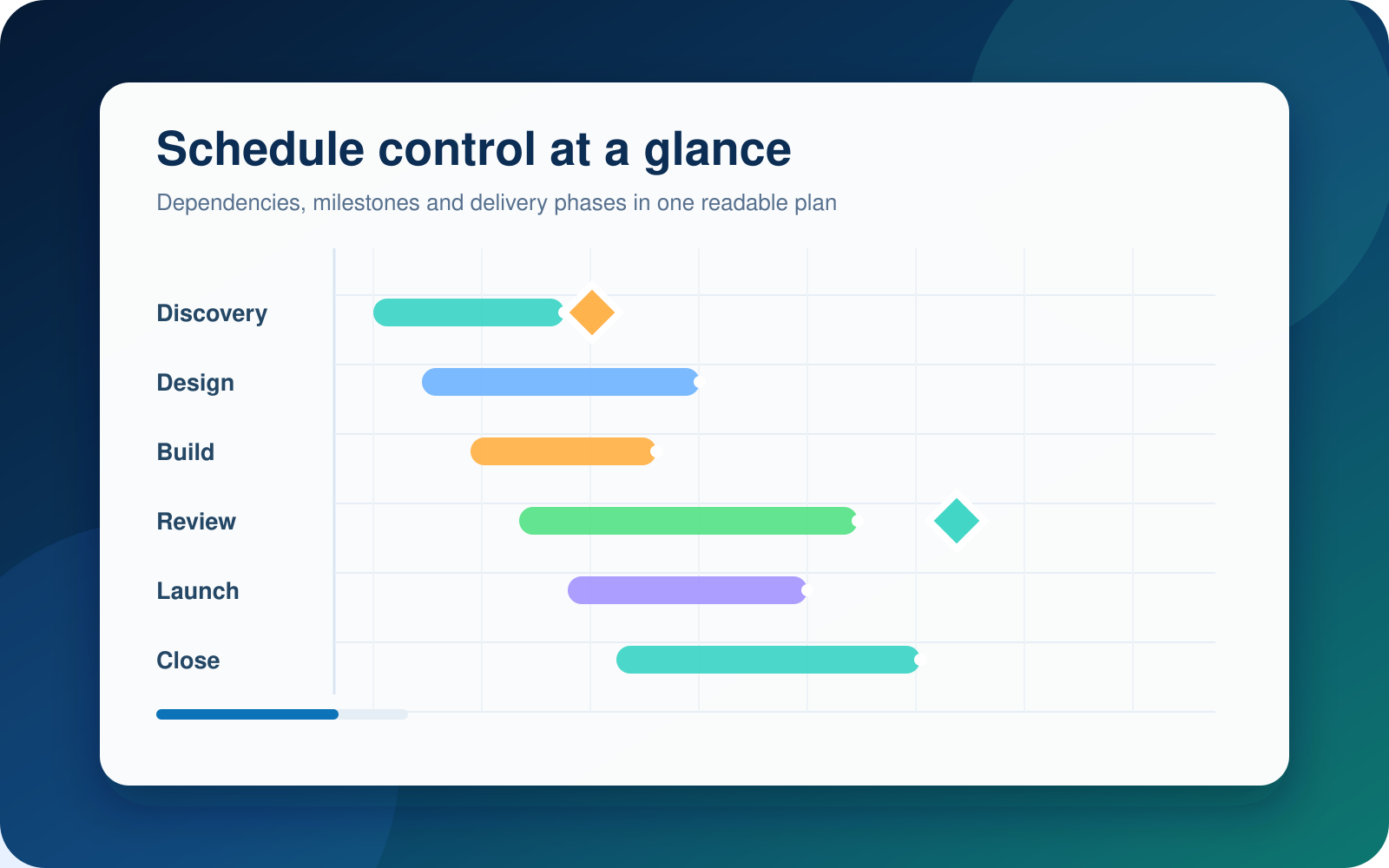
When tasks are linked correctly, the schedule becomes a decision model. Move one dependency and Project recalculates the downstream dates, allowing a project manager to explore options before committing the team.
- Create work breakdown structures with summary tasks and subtasks.
- Use milestones to mark approvals, handovers, launches and contractual gates.
- Model finish-to-start and other dependency relationships with lead or lag where appropriate.
- Display the critical path to focus attention on tasks that control the finish date.
- Save a baseline and compare it with actual progress as the project moves.
- Build timelines that translate detailed schedules into stakeholder-ready views.
Plan locally, connect when the environment supports it
Project 2013 Professional includes the familiar desktop scheduling experience and adds capabilities intended for more connected project environments. The distinction matters: buying the Professional desktop application does not by itself create a shared enterprise platform.
Project Server, SharePoint, server licences, access licences and infrastructure are separate considerations. If your organisation operates a compatible Project Server 2013 environment, Professional is the desktop edition designed to connect to it. Without that environment, it still functions as a capable standalone project planning application.
- Use Team Planner to view assignments by resource and reorganise work visually.
- Work with local resource pools across related plans.
- Connect to compatible Project Server services where they are already deployed.
- Use enterprise resources and published project workflows when the server environment provides them.
What is not included
This purchase should not be described as Project Online, Microsoft Planner Premium, a Microsoft 365 subscription, Project Server, SharePoint Server or an enterprise CAL package.
Practical rule: buy Project 2013 Professional for the installed desktop application and its Professional capabilities. Treat server collaboration as a separate architecture and licensing decision.
See capacity pressure before it becomes a missed date
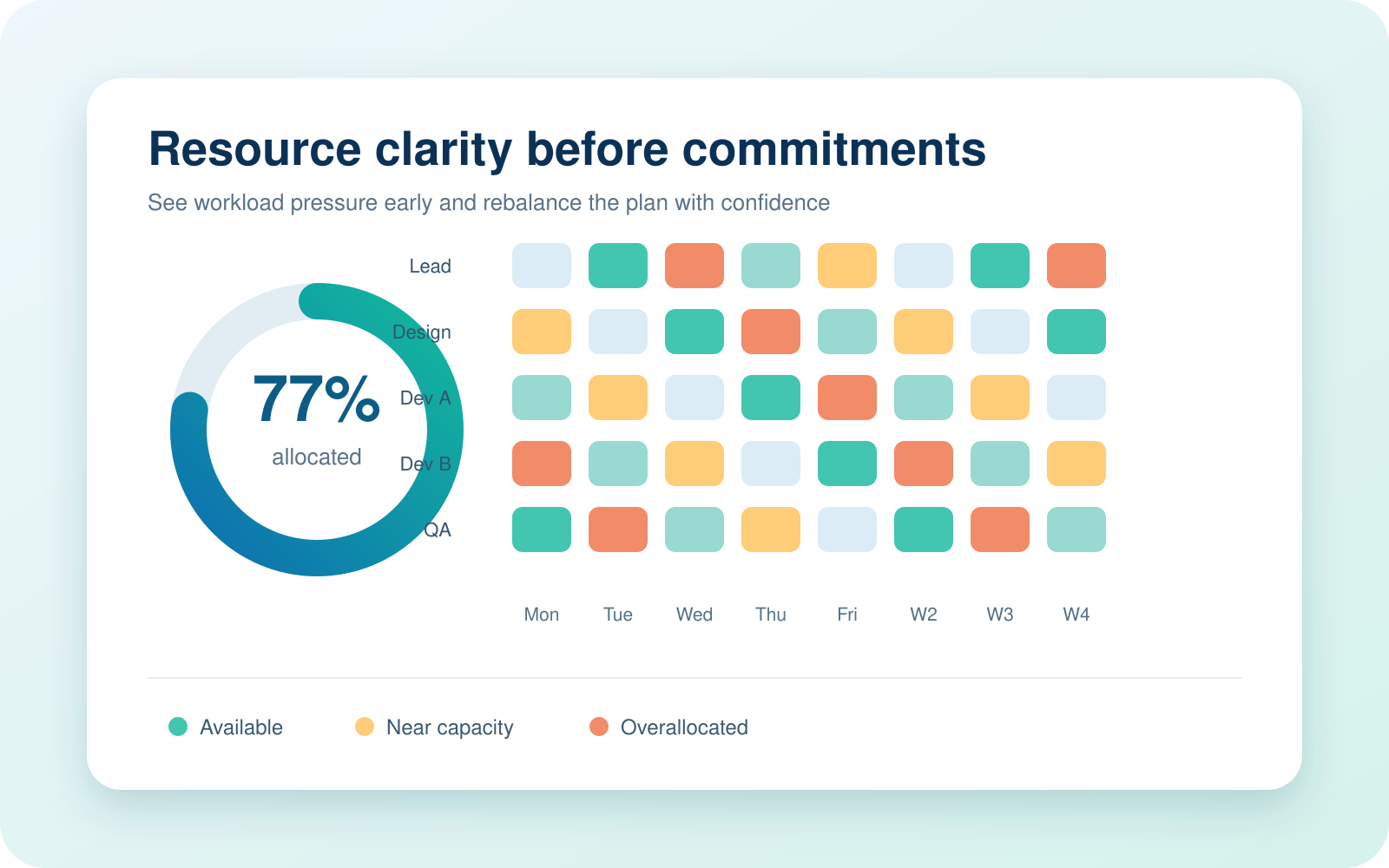
A schedule can look achievable until the same specialist is assigned to overlapping work. Project 2013 Professional makes assignments, calendars and utilisation part of the plan rather than an afterthought.
- Define working time and exceptions with resource calendars.
- Assign people, equipment, materials and cost resources.
- Review resource usage and graph views for workload patterns.
- Identify overallocations and evaluate reassignment, delay or levelling options.
- Model rates and fixed costs to improve budget visibility.
Choose the edition for the way you work
Both editions cover core desktop scheduling. Professional is the better fit when resource assignment views or connection to a compatible Project Server environment matter.
| Capability | Project 2013 Professional | Project 2013 Standard |
|---|---|---|
| Gantt charts, tasks, milestones and dependencies | Included | Included |
| Manual and automatic scheduling | Included | Included |
| Task path highlighting and critical path analysis | Included | Included |
| Built-in graphical and burndown reports | Included | Included |
| Resource assignment and cost tracking | Included | Included |
| Team Planner view | Included | Professional feature |
| Connection to compatible Project Server environment | Supported by the Professional client | Not the server-connected edition |
| Project Server, SharePoint infrastructure or server CALs | Not included | Not included |
| Best fit | Advanced desktop planning, resource-led schedules and legacy Project Server connectivity | Standalone scheduling without Professional-specific collaboration requirements |
Build control into every stage
Project software creates value when it supports a disciplined management cycle, not when it merely produces a beautiful Gantt chart.
Define
Capture scope, outcomes, calendars, constraints and the work breakdown structure.
Sequence
Link dependencies, validate logic, identify milestones and review the critical path.
Resource
Assign people and costs, resolve overloads and set a realistic baseline.
Control
Update actuals, review variance, forecast the finish and communicate decisions.
A proven tool for schedule-driven work
Project 2013 Professional remains relevant where an organisation deliberately maintains a compatible legacy environment, needs access to an established Project 2013 workflow or prefers a one-time desktop licence for a defined PC.
Construction and engineering
Model phases, contractors, dependencies, procurement dates, inspections and handover milestones.
IT implementation
Sequence discovery, configuration, migration, testing, training and release activities.
Professional services
Coordinate consultants, deliverables, approvals, budgets and client reporting across an engagement.
Operations and change
Plan facility moves, process redesign, equipment rollouts and cross-functional change programs.
Legacy project estates
Maintain workflows built around Project 2013 files, templates, macros or an existing server platform.
Training and controlled labs
Support a curriculum or isolated environment that specifically requires the 2013 interface and file behaviour.
Check the PC, Office environment and purpose before buying
Project 2013 is legacy software. The right buying decision starts with the exact device and installation environment, not the phrase "Windows 7 or later".
| Environment factor | What to know before ordering |
|---|---|
| Historically listed Windows versions | Microsoft's Project Professional 2013 installation requirements list Windows 7, Windows 8, Windows 8.1, Windows 10 and Windows Server 2008 R2. These are historical requirements, not a statement that those operating systems remain supported today. |
| Windows 11 | Windows 11 is not included in Microsoft's published Project Professional 2013 installation-requirements list. Do not purchase on the assumption of official Windows 11 support. |
| 32-bit or 64-bit | The Project installation should normally match the bitness of the existing Office applications on the PC. Mixed Office bitness is generally not a safe assumption. |
| Existing Microsoft 365 or Office | Version, bitness and installation technology can affect coexistence. Ask for a compatibility check before ordering if another Office family is installed. |
| Project files | Project 2013 and Project 2016 use the same MPP file format. When sharing with older or newer releases, test formulas, custom fields, reports, macros and connected features. |
| Project Server | Project Professional 2013 is designed for Project Server 2013 connectivity. Microsoft documents that it does not connect to Project Server 2010. Server compatibility and patch level must be checked separately. |
| Internet and account access | Digital fulfilment, download, installation resources and activation may require internet access. Requirements can vary by licence and installation media. |
Security and compliance decision
Microsoft ended Project 2013 support on 11 April 2023. The product no longer receives security updates, non-security updates or Microsoft assisted support. Organisations with security baselines, cyber insurance controls, regulated data or audit obligations should have IT approve the deployment and may be better served by a supported Project release.
A perpetual licence means the licensed edition does not expire; it does not extend Microsoft's product lifecycle.
Know exactly what you are buying
Included with the selected product option
- A licence for Microsoft Project 2013 Professional for the number of PCs selected.
- Digital fulfilment information for the purchased licence.
- The installed Windows desktop application, subject to compatibility.
- Perpetual use rights for that edition under the applicable licence terms.
- Software Mart Australia order support and the assistance stated on the product page.
Not automatically included
- Microsoft 365, Office applications, Windows or a new PC.
- Project Server, SharePoint Server, SQL Server or server access licences.
- Project Online, Microsoft Planner Premium or cloud portfolio services.
- Microsoft lifecycle support, future feature upgrades or security updates.
- Guaranteed compatibility with Windows 11 or every modern Office installation.
Prepare first, then install with confidence
Verify
Confirm Windows version, system type, existing Office release and 32-bit or 64-bit architecture.
Protect
Back up important files, save the order details and create a restore point where appropriate.
Install
Use the supplied fulfilment instructions and choose the Office-compatible architecture.
Activate
Complete activation, run available legacy updates where obtainable and test a sample MPP file.
Project 2013 or a newer release?
Choose 2013 because a verified requirement points to it - not merely because it has a lower purchase price.
| Decision factor | Project 2013 Professional | Newer supported direction |
|---|---|---|
| Primary reason to choose | Legacy compatibility, an established 2013 workflow or a controlled environment that specifically needs this edition. | Current security servicing, modern Windows alignment and longer operational runway. |
| Licence preference | One-time purchase for a defined desktop edition. | Choose a supported perpetual release or the appropriate Microsoft subscription plan. |
| Security posture | Out of support; requires risk acceptance and suitable controls. | Preferred for security-conscious and regulated production environments. |
| Modern collaboration | Legacy server and SharePoint-era integration, when separately deployed and compatible. | Better aligned with current Microsoft work-management and collaboration services. |
| Best buyer | An informed buyer with a verified technical need. | Most new deployments and organisations standardising on current platforms. |
Clear advice matters more with legacy software
A conversion should begin with the right product, not end with an avoidable compatibility problem. Software Mart Australia helps buyers understand the edition, licence choice, delivery method and practical installation considerations before they commit.
Microsoft Project 2013 Professional FAQs
Is Microsoft Project 2013 Professional a one-time purchase?
Yes. The product is offered as a perpetual licence for the selected number of PCs rather than a recurring Project subscription. Perpetual use does not mean perpetual Microsoft support or entitlement to newer versions.
Does Project 2013 Professional still receive Microsoft updates?
No. Microsoft lists 11 April 2023 as the end of extended support for Project 2013 Professional and Standard. New security updates, non-security updates and Microsoft assisted support are no longer provided for the product.
Can I install Project 2013 Professional on Windows 11?
Windows 11 is not included in Microsoft's published Project Professional 2013 installation-requirements list. Do not assume official compatibility. Contact Software Mart Australia before buying if Windows 11 is the intended operating system.
Which Windows versions did Microsoft historically list?
Microsoft's Project Professional 2013 installation requirements list Windows 7, Windows 8, Windows 8.1, Windows 10 and Windows Server 2008 R2. Those entries are historical compatibility information; the listed operating systems may themselves be out of support.
Is this Microsoft Project or Microsoft Office?
It is the standalone Microsoft Project desktop application. It does not include Word, Excel, Outlook, PowerPoint, Windows or a Microsoft 365 subscription.
Does the licence include Project Server 2013?
No. Project Server, SharePoint infrastructure, SQL Server and any required server or access licences are separate products. Project 2013 Professional is the desktop client that can connect to a compatible environment.
What is the difference between Project 2013 Professional and Standard?
Both editions include core desktop scheduling, resources and reporting. Professional adds capabilities aimed at advanced resource assignment and server-connected work, including Team Planner and connectivity to a compatible Project Server environment.
Can Project 2013 Professional create Gantt charts?
Yes. Gantt Chart is a central Project view. You can organise tasks, set durations, add milestones, link dependencies, display progress and identify the critical path.
Can it track project costs?
Yes. You can work with resource rates, cost resources, fixed task costs, baselines and actual progress to review planned and actual values. The quality of the result depends on accurate setup and disciplined updates.
Does Project 2013 include resource management?
Yes. It supports work, material and cost resources, assignments, calendars, usage views and overallocation analysis. Professional also includes Team Planner for a visual assignment perspective.
What are task paths?
Task paths highlight the predecessor and successor chain for a selected task. They make it easier to understand why a task starts when it does and what downstream work may be affected by a change.
Does Project 2013 have built-in reports?
Yes. Microsoft introduced a redesigned set of graphical reports in Project 2013, including configurable charts and burndown reporting that can be created inside the application.
Can I save a Project file as PDF?
Project desktop can create PDF or XPS output for suitable views and reports. A PDF preserves layout for sharing, but Project cannot reopen a PDF as an editable schedule.
Can Project 2013 open Project 2016 files?
Microsoft states that Project 2013 and Project 2016 use the same MPP file format. Even so, test specialised reports, custom fields, macros and connected functionality before relying on round-trip editing.
Can I install it alongside Microsoft 365?
Possibly, but coexistence depends on architecture, version and installation technology. The safest approach is to identify the installed Office product and whether it is 32-bit or 64-bit, then request a compatibility check before purchase.
Should I choose 32-bit or 64-bit?
The Project architecture should normally match existing Office applications on the PC. 32-bit can be appropriate for legacy add-ins, while 64-bit can be useful for very large files; compatibility with the existing Office installation should drive the choice.
Does Project 2013 Professional work on a Mac?
No native macOS edition of Project 2013 Professional is included. A Windows environment is required. Virtualisation introduces separate Windows licensing, hardware and compatibility considerations.
Can several people use one PC licence?
The product option identifies the number of licensed PCs, not an unlimited organisation-wide entitlement. Choose the PC quantity that matches the intended deployment and review the applicable licence terms.
Is internet access required?
Digital delivery, downloading installation resources and activation may require internet access. After installation, many desktop planning features work locally, while online and server-connected functions naturally require the relevant services and connectivity.
Is this the best choice for a new business deployment?
Usually only when there is a specific, verified legacy requirement. Most new business deployments should prioritise a supported Project release or current Microsoft work-management plan for security, compatibility and service continuity.
What should I check before placing the order?
Confirm the Windows version, 32-bit or 64-bit Office architecture, existing Microsoft 365 or Office installation, required PC count, need for Project Server connectivity and your organisation's policy on unsupported software.
What happens after purchase?
You receive the order and digital fulfilment information associated with the selected product option. Follow the supplied instructions, preserve the purchase record and request help promptly if the installed environment differs from the order assumptions.
Research behind this page
This content distinguishes historical system requirements from current support status. For technical review, consult Microsoft's own documentation:
Choose the right Project release
Is Project 2013 Professional the right fit?
Choose this edition when
Your requirement specifically calls for the Professional 2013 desktop release and the target Windows and Office environment has been checked for compatibility.
Compare a later release when
The exact 2013 version is not mandatory and you want to review newer perpetual Project options before ordering.
Related Project options
Ready to bring structure to the next project?
Choose Microsoft Project 2013 Professional when a verified legacy requirement calls for this exact desktop edition. If compatibility is uncertain, ask first - the correct environment is part of the purchase decision.
Microsoft, Project, Windows, SharePoint and related names are trademarks of Microsoft Corporation. Product capabilities can depend on edition, service pack, infrastructure and configuration. This page does not replace the applicable Microsoft licence terms. Verify technical and licensing requirements before deployment.