Retail / Microsoft account · One Windows PC
Turn moving parts into a plan you can trust
Create schedules, connect dependencies, test task assignments and track progress with Microsoft Project Standard 2024—a focused desktop planning solution purchased once for one licensed PC.
Quick product facts
Designed for one desktop planner: this is a one-PC retail offer. It is not a subscription, Project Server licence, RDS licence, volume licence or multi-device entitlement.
Focused desktop project management
Build the schedule, test the logic and communicate the result
Project Standard 2024 gives an individual project manager the core desktop tools needed to move from an informal task list to a structured, dependency-aware delivery plan.
Start faster with templates
Use pre-built templates and the Getting Started experience to create a practical structure without beginning every project from a blank file.
Let dependencies drive dates
Connect tasks, milestones and calendars so Project can calculate start and finish dates and show how a change flows through the schedule.
Test task assignments
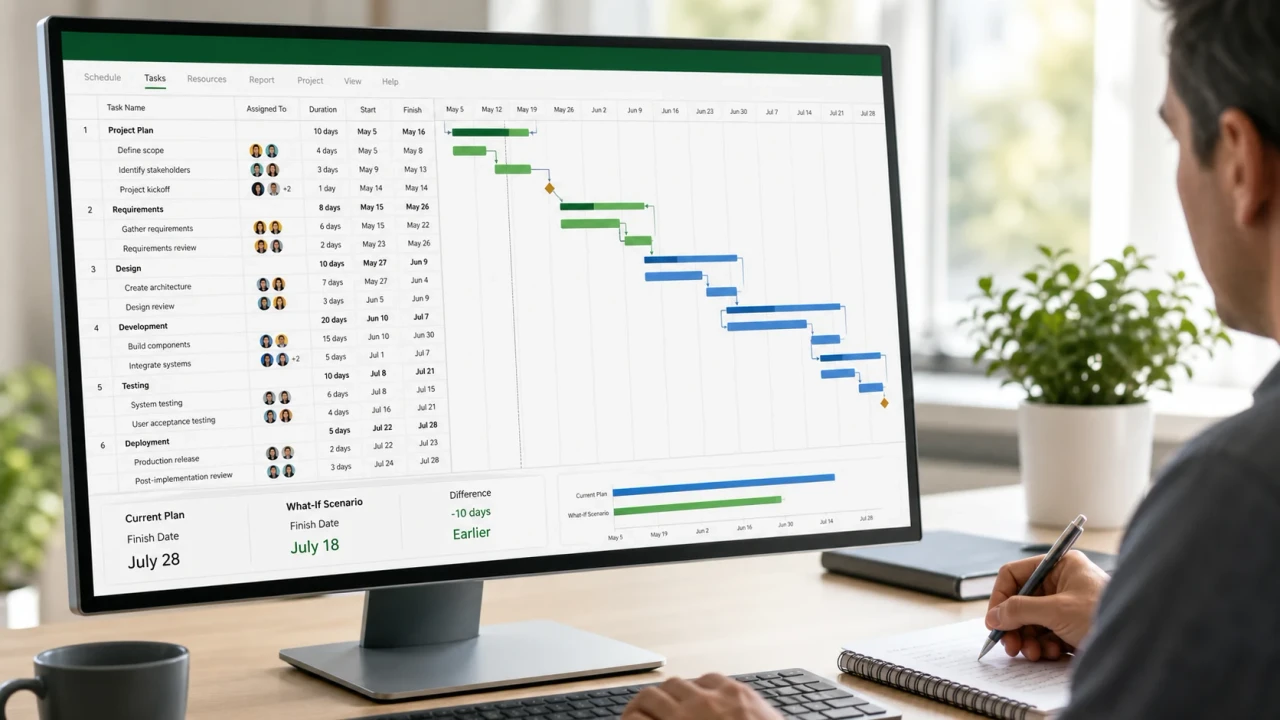
Run what-if scenarios, adjust assignments and review workload implications before committing the team to an unrealistic finish date.
Report without rebuilding the story
Use baselines, built-in reports and multiple timelines to show where the plan started, what changed and what needs attention now.
Assignments and what-if planning
Make the trade-off visible before the date slips
A credible schedule should show what happens when duration, sequence or responsibility changes. Project Standard helps you model those decisions inside the plan instead of relying on disconnected spreadsheets.
- Assign people, equipment and material resources to tasks
- Review resource units, calendars and workload views
- Highlight task paths, predecessors and successors
- Compare alternative dates before accepting a change
Baselines, timelines and reports
Show progress against the promise
Save the approved schedule as a baseline, record actual progress and use built-in reporting to reveal variance. Decision makers get a clearer view of dates, milestones, work and cost without needing to interpret the entire project file.
Microsoft Project supports project cost planning and tracking; it is not accounting, payroll or ERP software.

Choose the right edition
Excellent for structured individual planning—not enterprise collaboration
Choose Standard 2024 if you…
- Build and maintain project plans from one Windows PC
- Need Gantt charts, dependencies, milestones and critical-path visibility
- Want baselines, reports and multiple timelines
- Prefer a one-time purchase to a recurring subscription
- Do not need Project Server sync or enterprise timesheets
Choose another product if you…
- Need installations on two or more computers
- Require Project Online or Project Server connectivity
- Need enterprise resource pools or timesheet submission
- Want browser-first teamwork and continuously updated cloud features
- Use macOS, Chromebook, iPadOS or Android as the required platform
Edition comparison
Standard, Professional or subscription?
Choose according to how you plan, where you collaborate and whether organisational connectivity or ongoing feature updates are required.
| Capability | Standard 2024 | Professional 2024 | Planner and Project Plan 3 |
|---|---|---|---|
| Purchase model | One-time purchase | One-time purchase | Recurring subscription |
| Licensed desktop installations | One PC | One PC | Up to five PCs for the licensed user |
| Gantt charts, dependencies and baselines | Included | Included | Included, plan-dependent |
| Built-in reports and multiple timelines | Included | Included | Included, plan-dependent |
| Project Online / Project Server sync | Not included | Included | Cloud services, plan-dependent |
| Timesheet submission | Not included | Included with supported services | Cloud services, plan-dependent |
| Ongoing feature updates | No—security and quality updates only | No—security and quality updates only | Yes, while subscribed |
Compare with Project Professional 2024 Retail Browse Project 2024 editions
Compatibility first
Check Windows, Office and the account owner before ordering
Processor
1.6 GHz or faster, two-core processor.
Memory
4 GB RAM; Microsoft lists 2 GB for 32-bit.
Storage
At least 4 GB of available disk space.
Display and graphics
1280 × 768 or higher; DirectX 10 graphics for hardware acceleration.
Operating system
Windows 11 is recommended. Microsoft also lists Windows 10 and Windows Server 2019; check current lifecycle status before purchase.
Setup
Internet access and a Microsoft account are required for this retail account-linked offer.
Retail / Microsoft Account Bind explained
Redeem once, retain the account, manage one licensed PC
During first-time setup, the retail product key is redeemed while signed in to an existing or new Microsoft account. Microsoft states that redemption links the account with the Project app, so the licence owner should use an account they control and can retain.
Microsoft account linked
Redeem through Microsoft’s setup process using the account that should manage download and installation access.
One licensed PC
Install and activate one instance on one licensed physical or virtual PC. A second PC requires another licence.
Retail transfer provisions
Microsoft’s stand-alone retail terms generally permit transfer to another device you own no more than once every 90 days, except after hardware failure. Remove the software from the previous device.
No subscription renewal
The licensed 2024 version does not require a recurring subscription payment. Future major releases are not included.
Digital fulfilment
From verified order to an account-linked installation
- 01
Place the order
Purchase the dedicated Project Standard 2024 Retail one-PC product through secure checkout.
- 02
Order verification
Software Mart completes payment and order checks required for digital fulfilment.
- 03
Receive instructions
Digital delivery includes the supplied retail licence information and setup guidance.
- 04
Redeem to your account
Sign in to Microsoft’s setup service with the account that will own and manage the entitlement, then redeem the key.
- 05
Download and activate
Install Project on the licensed PC, complete activation and confirm that Project Standard 2024 appears in Product Information.
Read the digital delivery policy Ask a pre-purchase question
Lifecycle visibility
Plan around a defined support horizon
Microsoft lists Project 2024 Standard and Professional under the Modern Lifecycle Policy, with retirement on 9 October 2029. The application remains a perpetual licensed version, but security planning and supported operating-system compatibility still matter.
Buyer questions
Microsoft Project Standard 2024 Retail FAQs
Clear answers to the questions that should be resolved before payment.
What does “Retail / Microsoft Account Bind” mean?
The retail key is redeemed while signed in to a Microsoft account. Microsoft states that redemption links the account with the Project app. Use an account the licence owner can retain and recover.
Is this a subscription?
No. It is a one-time purchase for the licensed Project Standard 2024 version. It does not include automatic rights to a future major release.
How many computers can I install it on?
One licensed Windows PC. A second computer requires another licence.
Can I move the retail licence to another PC?
Microsoft’s stand-alone retail terms generally allow transfer to another device you own no more than once every 90 days, except following hardware failure. Remove the software from the previous device and follow Microsoft’s activation process.
Does Project Standard 2024 run on a Mac?
No. Project Standard 2024 is a Windows desktop application. A virtualised Windows installation is a separate compatibility decision and still counts as the licensed device.
What is the difference between Standard and Professional?
Both provide core desktop scheduling, dependencies, baselines, reports and multiple timelines. Professional adds features intended for connected organisational workflows, including Project Online or Project Server sync and supported timesheet scenarios.
Can Standard manage people and task assignments?
Yes. You can add resources, assign them to tasks, review resource units and workloads, and run what-if scenarios. Enterprise resource-pool integration is a Professional feature.
Will it work beside Microsoft 365 Apps?
Supported combinations depend on installation technology, update channel, version and bitness. Update Microsoft 365 Apps and confirm compatibility before installing Project.
Can I use it through RDS or on a shared server?
This dedicated retail product is not positioned for RDS, pooled desktops, shared-server deployment or volume licensing. Contact Software Mart for a correctly licensed organisational solution.
What happens after purchase?
After payment and order verification, Software Mart provides digital licence information and setup guidance. Delivery timing can vary when an order requires additional verification.
Does Software Mart provide installation help?
Software Mart setup assistance is available. Contact the team before ordering if your PC has an older Office installation, an unusual deployment channel or a complex business environment.
Confirm compatibility. Link the right account. Plan with clarity.
Ready for Project Standard 2024 on one Windows PC?
Choose the dedicated retail / Microsoft account-linked licence and receive digital fulfilment after payment and order verification.