Microsoft Project Standard 2024: plan with clarity, deliver with control
Build credible schedules, connect dependencies, allocate resources, track costs and communicate progress in a familiar desktop environment designed for focused project management.
 Windows desktop software
  Standalone purchase
  Electronic fulfilment
  Edition-accurate guidance
Choose the required licence/device option and confirm compatibility before checkout. The option selected above determines the supplied licence terms.




A precise plan is more than a timeline
Microsoft Project Standard 2024 helps project managers and IT professionals translate commitments into a structured delivery model—one that makes sequence, responsibility, capacity, cost and progress easier to understand.
Use it to create a work breakdown structure, calculate dates from task logic, assign resources, save a baseline, update actual progress and prepare stakeholder-ready reports. That discipline helps teams spot pressure sooner and make changes with evidence rather than instinct.


Everything needed to build and control a dependable desktop project plan
From the first task list to the final status update, Project Standard 2024 gives individual planners a coherent set of scheduling, tracking and reporting tools.

Structured project planning
Organise objectives into phases, summary tasks, deliverables and work packages that are easier to estimate, assign and control.

Automated scheduling
Let dates respond to durations, task relationships, calendars and constraints so the schedule reflects the logic you enter.

Gantt chart clarity
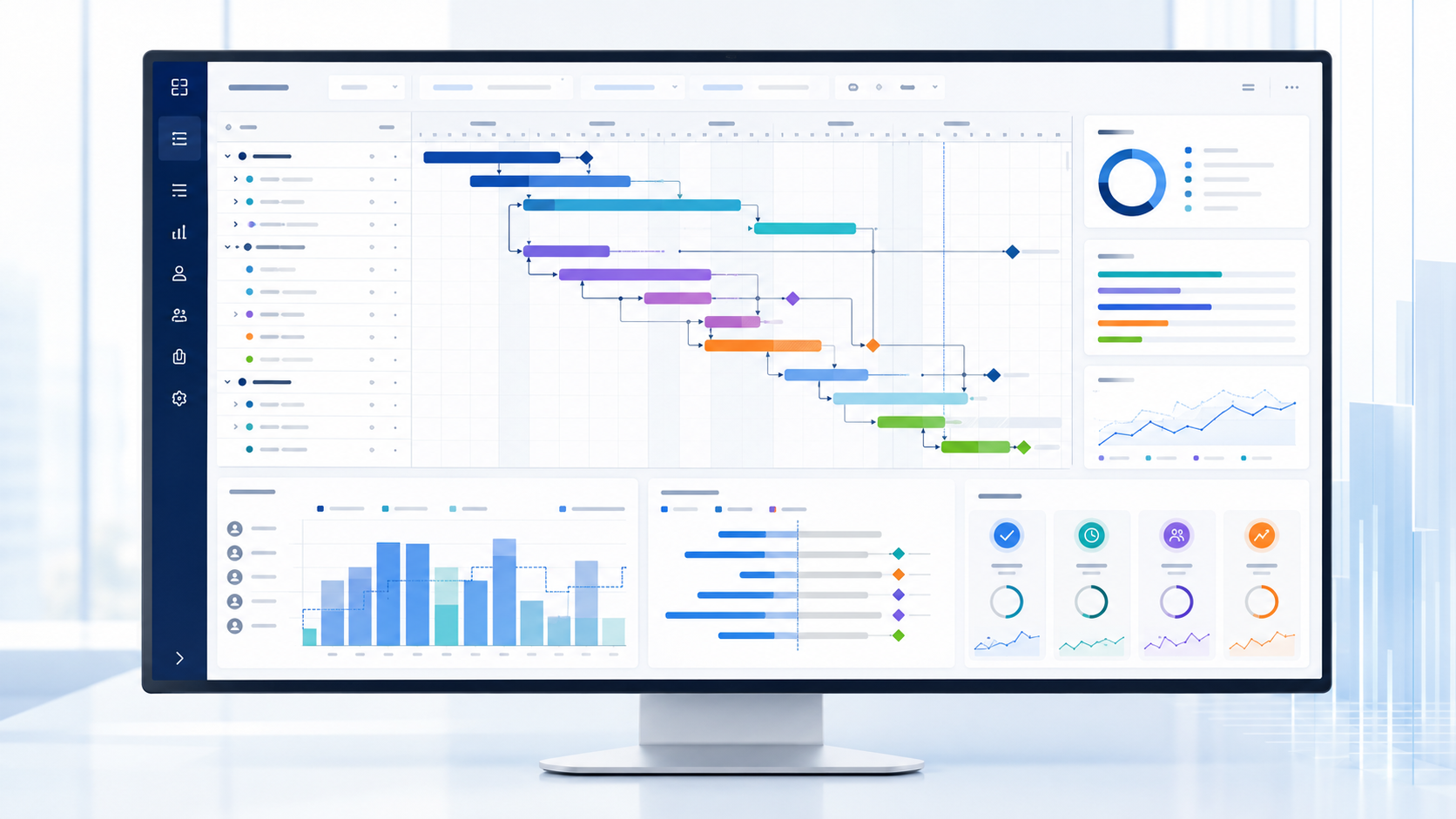
See tasks, milestones, links and progress across time in one familiar visual planning environment.

Resource visibility
Assign work, material and cost resources, then review assignments and potential workload pressure.

Baseline control
Preserve the approved plan and compare scheduled performance with updated dates, work and costs.
Built-in reporting
Present live project information through visual reports for schedule, cost, resource and progress conversations.
Turn complex work into a plan people can act on
Project Standard 2024 supports the practical mechanics of good planning: break work into manageable components, define the sequence, identify critical dates and keep the current position visible.
 Work breakdown structure
Group tasks into phases and summary tasks so the plan mirrors how the work will be delivered.
 Task relationships
Connect activities with finish-to-start, start-to-start, finish-to-finish or start-to-finish logic.
Calendars and constraints
Represent working time, non-working days, deadlines and genuine scheduling limitations.
 Milestones and gates
Make approvals, handovers, releases and contractual dates visible in the plan.
Critical path insight
Review schedule-driving activities using the durations, relationships and constraints in your file.
 Reusable templates
Standardise proven planning structures without rebuilding every project from the beginning.
Define, schedule, baseline and control
A strong project file is a living management instrument—not just a launch-day chart. Use a repeatable cycle that keeps the approved plan and current reality connected.
Clarify the work
Capture the outcome, delivery phases, assumptions, calendar, responsibilities and key milestones.
Model the logic
Estimate durations, link dependencies, assign resources and calculate a credible delivery path.
Approve the target
Save the agreed schedule and cost position so future change can be measured objectively.
Manage reality
Update actual progress, review variance, resolve conflicts and communicate the next decision.
Practical controls for time, people, money and progress
Schedules and timelines
Use Gantt views, milestones, dependencies and multiple timeline views to communicate both detailed logic and executive-level dates.
Resources and workload
Assign people, materials and cost resources, review allocation and investigate conflicts before they undermine delivery.

Costs and budgets
Model rate-based, fixed and cost-resource information so planned financial impact is visible beside scheduled work.
Baselines and variance
Compare the approved position with current dates, duration, work and costs to make change and slippage explicit.
Visual reporting
Build clear status conversations around live plan data instead of manually reconciling disconnected spreadsheets.
Repeatable methods
Use templates and reusable structures to support consistent governance across comparable projects.
Empower every project conversation with clearer evidence

For project managers
Create defensible schedules, identify the critical path, test planning scenarios and report progress without relying on multiple disconnected trackers.

For IT professionals
Plan deployments, migrations, upgrades and infrastructure work with transparent dependencies, owners, maintenance windows and release milestones.
For decision-makers
Understand the approved target, current position and emerging pressure in a form that supports faster and better-governed decisions.
A stronger command centre for project managers
- Translate scope into phases, tasks, deliverables and milestones.
- Build dependency-aware schedules and explore what-if changes.
- Assign resources and make workload assumptions visible.
- Baseline the approved plan and track variance over time.
- Prepare schedule, cost and progress views for stakeholders.
Purposeful planning for IT delivery
- Sequence discovery, build, test, migration and go-live work.
- Represent change windows, outage-sensitive tasks and dependencies.
- Coordinate technical owners, vendors and business approvals.
- Track readiness gates, issues reflected as tasks and recovery actions.
- Create a durable record of the plan and actual delivery path.
Useful across industries, departments and delivery methods
Project Standard 2024 can support predictive, hybrid and carefully structured operational initiatives wherever sequence, capacity and deadlines must be managed.

Construction
Phases, procurement, subcontractors, inspections and handover milestones.
IT delivery
Discovery, configuration, testing, migration, change windows and go-live.
Engineering
Design packages, reviews, manufacture, commissioning and technical links.
Professional services
Client deliverables, utilisation assumptions, deadlines, costs and reporting.
Operations
Process improvement, equipment installation, site changes and readiness.
Marketing
Campaign production, approvals, events, channel activity and launch dates.
Education
Research plans, programme delivery, facilities work and curriculum projects.
Product launches
Design, sourcing, testing, enablement, release and market coordination.
Project Standard 2024 is ideal when focused desktop planning is the priority
Choose Standard 2024 if you need:
- A perpetual-generation Windows desktop project-planning application.
- Gantt charts, dependencies, milestones and critical path analysis.
- Standalone resource, cost, baseline, tracking and reporting tools.
- Local project-file workflows for an individual project manager.
- A current release without requiring an ongoing Project subscription.
Consider Professional or a subscription if you need:
- Compatible Project Server or Project Online connectivity.
- Enterprise resource-management or organisation-wide portfolio workflows.
- Cloud-native collaboration and continuously updated service features.
- Mac-native project-management software.
- Features or rights not explicitly included in the selected Standard offer.
Microsoft Project Standard 2024 vs Project Professional 2024
Both editions support core desktop project planning. The deciding question is whether your environment requires compatible enterprise connectivity and associated organisational workflows.
| Capability or buying need | Project Standard 2024 | Project Professional 2024 |
|---|---|---|
| Best suited to | Individual managers and standalone desktop projects | Organisations requiring compatible enterprise connectivity |
| Gantt charts and scheduling | Included | Included |
| Dependencies and critical path | Included | Included |
| Multiple timelines | Included | Included |
| Resource and cost planning | Standalone project level | Desktop planning plus relevant enterprise scenarios |
| Built-in reports | Included | Included |
| Project Server / Project Online scenarios | Not the intended Standard use case | For compatible connected environments |
| Recommended choice | Focused desktop planning and control | Connected project and resource-management requirements |
Microsoft product capabilities, service availability and licensing can change. Verify any enterprise integration requirement against current Microsoft documentation and your organisation’s environment before purchase.
Moving to Project Standard 2024
For organisations still using an older perpetual release, Project Standard 2024 offers a current-generation deployment target. Review file complexity, macros, custom fields, add-ins, Office architecture and operational processes before migrating business-critical schedules.
| Version | Position | Deployment consideration | Practical guidance |
|---|---|---|---|
| Project Standard 2024 | Current perpetual generation | Modern supported Windows deployment | Best starting point for a new standalone desktop purchase |
| Project Standard 2021 | Previous generation | Check current lifecycle and operating-system fit | Retain only where the environment deliberately standardises on 2021 |
| Project Standard 2019 | Legacy generation | Review support and compatibility implications | Plan validation and migration before operational pressure forces change |
| Project Standard 2016 | Legacy generation | Older deployment profile | Prioritise migration planning and test complex files carefully |
A clear ownership model for desktop planning
Project Standard 2024 is a standalone desktop release. It suits buyers who want the feature set of this generation on a compatible Windows PC without relying on an ongoing Project subscription for continued use.
- One-time purchase model for the selected licence option.
- Desktop application installed on a compatible Windows device.
- Feature set remains tied to the purchased 2024 generation.
- Security and quality updates follow Microsoft’s applicable lifecycle.
- Future major-version upgrades are separate purchases unless expressly stated.
Licence scope matters
Microsoft’s retail Project Standard 2024 basis is one PC. This store may present quantity or device-count variants above; the exact selected option, supplied licence documentation and applicable Microsoft terms govern the installation rights.
Before ordering: confirm device count, Windows version, Office architecture, existing installations and whether you need Standard or Professional connectivity.
Confirm the device before purchase
The following summarises Microsoft’s published Project Standard 2024 requirements. Microsoft may update requirements; always verify the current product page for a business-critical deployment.




32-bit or 64-bit: Match Project to the architecture and deployment technology of compatible Office products where required. “Windows 10 or later” does not mean every device configuration is automatically compatible.
Electronic fulfilment with a defined path from purchase to planning
The exact contents depend on the selected offer, but an eligible completed order is prepared for digital fulfilment—without a physical disc or retail box unless the product option explicitly states otherwise.
Licence detailsInformation appropriate to the licence option purchased.Download directionElectronic instructions or an applicable source for obtaining the software.Setup guidanceInstallation and activation directions for the supplied offer. Order recordPurchase confirmation and support path linked to your order.
A straightforward digital process
Prepare first, install once
- Record the environment: Windows edition/build, 32/64-bit architecture, existing Microsoft 365 or Office products and available storage.
- Back up important files: protect active project schedules, templates, macros and custom reports.
- Resolve conflicts: mixed architectures or incompatible installation technologies can prevent a clean setup.
- Use the supplied source: follow the order instructions and avoid unofficial downloads.
- Activate and update: complete any Microsoft account, internet and update requirements.
- Test a real file: validate representative project files before relying on the new installation in production.
Microsoft 365 and Office coexistence
Being on the same Windows PC does not automatically guarantee coexistence. Architecture, Click-to-Run or MSI installation technology, product generation and update channel can affect compatibility.
If you are uncertain, contact support before purchase with the product names shown under Apps & features or Installed apps. Do not share account passwords, licence keys or payment information in a support request.
Local accountability around a digital purchase
Clear product information, published policies and reachable support help customers make a considered software decision and know where to turn if the order needs attention.

Australian business
Software Mart Australia publishes ABN 43 657 323 491 and Australian contact channels.
Secure checkout
Order and payment processing are handled through the store’s checkout and published privacy practices.
Digital delivery
Electronic fulfilment avoids physical postage and supports a faster path to installation.
Support path
Customers can use published email and telephone details when an eligible order needs assistance.
 Review the delivery information, refund policy, privacy policy and contact details before ordering. Refund eligibility can depend on the product, delivery and activation status; the published policy governs.
Microsoft Project Standard 2024 FAQ
Practical answers about features, licensing, compatibility, delivery and deployment.
1. What is Microsoft Project Standard 2024?
It is Microsoft’s Windows desktop application for building project schedules, connecting dependencies, assigning resources, tracking costs and progress, and presenting project information through visual plans and reports.
2. Is Project Standard 2024 a subscription?
No. It is sold as a standalone desktop release rather than an ongoing Project subscription. The purchased feature set remains tied to the 2024 generation, and a future major version is a separate purchase unless expressly included.
3. How many PCs can I install it on?
Microsoft’s retail Project Standard 2024 basis is one PC. If this store presents another device-count or quantity option, the selected option and the licence documentation supplied with the order determine the rights.
4. Does it work with Windows 11 and Windows 10?
Microsoft publishes Windows 11 and Windows 10 among the applicable operating systems. Confirm the device edition, build, architecture and current support status before purchase.
5. Does Project Standard 2024 work on a Mac?
There is no native macOS edition advertised for this product. Do not purchase it for a Mac unless you already operate an appropriately licensed, supported Windows environment that meets all requirements.
6. Is a 32-bit version available?
Microsoft’s requirements include memory guidance for 32-bit and 64-bit installations. The correct choice depends on the installer supplied and compatibility with other Office products. Check before ordering.
7. Can it be installed alongside Microsoft 365 or Office 2024?
Possibly, but compatibility depends on architecture, installation technology and update channel. Mixed 32/64-bit products or incompatible deployment technologies can cause conflicts.
8. What is the difference between Standard and Professional 2024?
Both support core desktop planning. Professional is the better fit when compatible Project Server, Project Online or other enterprise-connected scenarios are required. Standard is designed for focused standalone desktop planning.
9. Does Standard 2024 include Copilot?
Copilot should not be treated as an included Project Standard 2024 feature. Buy this edition for its established desktop scheduling, dependency, timeline, resource, cost, baseline and reporting capabilities.
10. Can it calculate a critical path?
Project can identify schedule-driving activities from the durations, task relationships, calendars and constraints entered in the file. The result is only as reliable as the planning data and logic.
11. Can it create Gantt charts?
Yes. Gantt views are central to visualising tasks, dates, dependencies, milestones and progress across the schedule.
12. Does it support multiple timelines?
Yes. Multiple timeline views can help present different workstreams or levels of detail to different audiences.
13. Can it manage resources and costs?
It supports standalone project-level resource assignments, workload review and cost planning. Do not confuse this with enterprise resource-pool capabilities that require other products or services.
14. Can I save and compare a baseline?
Yes. Baselines preserve planned schedule, work and cost information so the current project can be compared against an approved target.
15. Are reports included?
Project includes visual reporting capabilities based on data in the project file. The usefulness of a report depends on accurate and current schedule information.
16. Are templates available?
Microsoft highlights pre-built templates as a way to begin planning. Availability can depend on installation, internet access, account and current service configuration.
17. Can it open older Microsoft Project files?
Established Project file workflows are supported, but complex files, macros, add-ins, custom fields, reports and connected features should be tested before a business-critical migration.
18. Can I share project files with colleagues?
You can share files through your organisation’s approved storage and communication methods, but recipients need a compatible application and appropriate access to edit them. Standard does not itself create an enterprise collaboration service.
19. Is internet access always required?
Core desktop planning is local, but internet access and a Microsoft account may be required for installation, activation, updates, templates or connected services.
20. How is the product delivered?
This offer is prepared for electronic fulfilment. Check the selected option and order email for the licence details, download direction, setup instructions and support path. No physical box is promised here.
21. How quickly will I receive the order?
The store’s published delivery information says digital orders are typically fulfilled within 1–10 minutes, but verification or exceptional circumstances may take longer. Use accurate contact details and check filtered mail folders.
22. What should I do before installation?
Confirm system requirements, record existing Office products, back up project files, close applications and follow the supplied instructions. Resolve known compatibility issues before starting.
23. What if activation fails?
Record the exact error, confirm date/time and internet settings, verify the installed edition and follow the supplied activation steps. If support applies, provide your order number and error details—but never passwords or payment data.
24. Is technical support included?
Use the support information associated with the selected offer and order. Support scope can vary and does not replace a managed deployment service unless explicitly stated.
25. Can I transfer the licence to another PC?
Transfer rights depend on the exact licence type and applicable Microsoft terms. Do not assume transferability; review the supplied licence documentation before changing devices.
26. Can I use it for commercial work?
Project Standard is intended for professional project-planning use, subject to the licence terms supplied with the purchase and your organisation’s compliance requirements.
27. Does it connect to Project Online or Project Server?
Standard should not be bought for those enterprise-connected scenarios. Review Project Professional and the compatibility of your specific environment instead.
28. What is Microsoft’s support lifecycle for Project 2024?
Microsoft currently lists 9 October 2029 as the retirement date for Project 2024. Lifecycle information can change, so verify Microsoft’s current lifecycle page during long-term deployment planning.
29. What is the refund position for digital software?
Eligibility depends on the store’s published refund policy and factors such as product type, delivery and activation status. Read the refund policy before ordering and contact the store promptly if an issue occurs.
30. How do I decide whether this is the right edition?
Choose Standard when you need strong standalone Windows desktop planning. Choose Professional or a subscription solution when compatible enterprise connectivity, cloud collaboration or portfolio-wide services are essential. Confirm requirements before checkout.
Bring structure, visibility and responsibility to your next project
Select the correct Microsoft Project Standard 2024 licence option above, confirm your Windows and Office environment, and move forward with a clearer path from scope to successful delivery.
Verified reference links
Official Microsoft resources
Check current product, system, lifecycle and licensing information directly with Microsoft before deployment.
Microsoft documentation and lifecycle information may change. Review the current source for your environment and purchasing requirements.