Professional diagramming · 2024 edition
Microsoft Visio Professional 2024
Transform complex processes, systems and business data into clear, decision-ready diagrams—built for professionals who need more than a basic flowchart.
Clear licence information · Secure checkout · Digital fulfilment · Technical support


One-time purchase
A non-subscription desktop edition

Professional edition
Advanced technical and business diagrams

Windows desktop
For a compatible Windows installation

Guided support
Download, installation and activation help

Compatibility first
Check your PC and existing Office installation before purchasing.
Confirm Windows compatibility, 32-bit or 64-bit architecture, installation technology and the device count you need.
More than drawing software
A visual language for the way your organisation works.
Visio Professional 2024 combines structured diagramming, specialist templates, intelligent connectors and data-driven visualisation. Show how a process moves, how a network connects, how a system behaves or how a facility fits together—then give every stakeholder a clearer view.

Map the full process
Turn scattered steps, owners and decisions into one coherent visual system.

Connect shape to data
Give diagrams context with data graphics, status colours and linked information.
Work to recognised standards
Build and validate specialist diagrams with BPMN 2.0, UML 2.5 and more.

Communicate with authority
Create polished visuals that make complex recommendations easier to understand.
Know exactly what you are buying
Microsoft Visio Professional 2024 at a glance
Review the product, platform, payment model and licence entitlement before checkout. The exact offer should clearly state the permitted user or device count and the delivery method.
Licence clarity
The licence is part of the product—not a footnote.
Every order from this page may be supplied as Retail, OEM or MAK according to available stock. Before paying, confirm the selected device count, region, language, compatibility and type-specific reinstallation terms.
Edition
Confirm Professional 2024—not Standard, Plan 1, Plan 2 or an older release.
Channel
The licence type supplied may be Retail, OEM or MAK according to available stock. Activation, transfer and reinstallation terms depend on the type supplied.
Users and devices
Use the quantity and entitlement stated with the selected SKU.
Updates and upgrades
Servicing is included, but future major versions are not automatic.
Technical specifications
System requirements and coexistence checks
Review both minimum hardware and your existing Microsoft software environment. Windows 11 is the recommended current platform.
Published support lifecycle
Microsoft lists 10 October 2029 as the retirement date for Visio 2024 Professional and Standard.
From order to first diagram
A clear installation path.
The supplied type may be Retail, OEM or MAK according to available stock. Begin with a compatibility check before installation and activation.
Check compatibility
Confirm Windows, storage, Office architecture and installation technology.
Receive your order
Review the supplied licence type, download and installation instructions before activation.
Install the supplied edition
Follow the instructions supplied for the Retail, OEM or MAK type received, then complete activation.
Choose architecture
Match 32-bit or 64-bit Visio to the Office products already installed.
Install Visio
Download the official installer and complete the guided desktop installation.
Activate and verify
Open Visio, activate as instructed and confirm the product status.
What you receive
A clear digital fulfilment package
Your order is fulfilled according to the exact product and licence description shown at checkout. Review every supplied instruction before deploying or activating the software.


Digital fulfilment may follow successful payment and any order verification required for transaction security.
Software Mart Australia
Clear information. Secure ordering. Practical support.
Purchase with a clearer understanding of the product, its compatibility requirements and the digital fulfilment process. Assistance is available for the supplied download, initial installation and activation within the advertised support scope.
Clear product details
Review the edition, platform, delivery method and stated licence entitlement before ordering.

Protected checkout
Checkout is handled through the store's secure payment process and may include order verification.
Digital fulfilment
Receive the product-specific fulfilment information using the delivery method stated at checkout.
Installation assistance
Get practical guidance for the supplied download, initial installation and activation process.
What’s new in 2024
Familiar power, sharpened for modern diagramming.
Move from Visio 2021 with the capabilities you rely on, plus refreshed professional content and a more current working experience.
More professional content
Expanded shapes, stencils and templates for richer diagramming from the first canvas.
New Azure stencils
More than ten new Azure stencils for modern cloud architecture and infrastructure planning.
Kubernetes shapes
Document container platforms and cloud-native systems with added software and network content.
Yourdon–Coad notation
Additional software-design content for object-oriented analysis and system documentation.
Modern Office 2024 theme
A refreshed colour system and visual language aligned with the current Office experience.
Improved command search
A prominent title-bar search experience helps users reach tools and actions more quickly.
One canvas, many disciplines
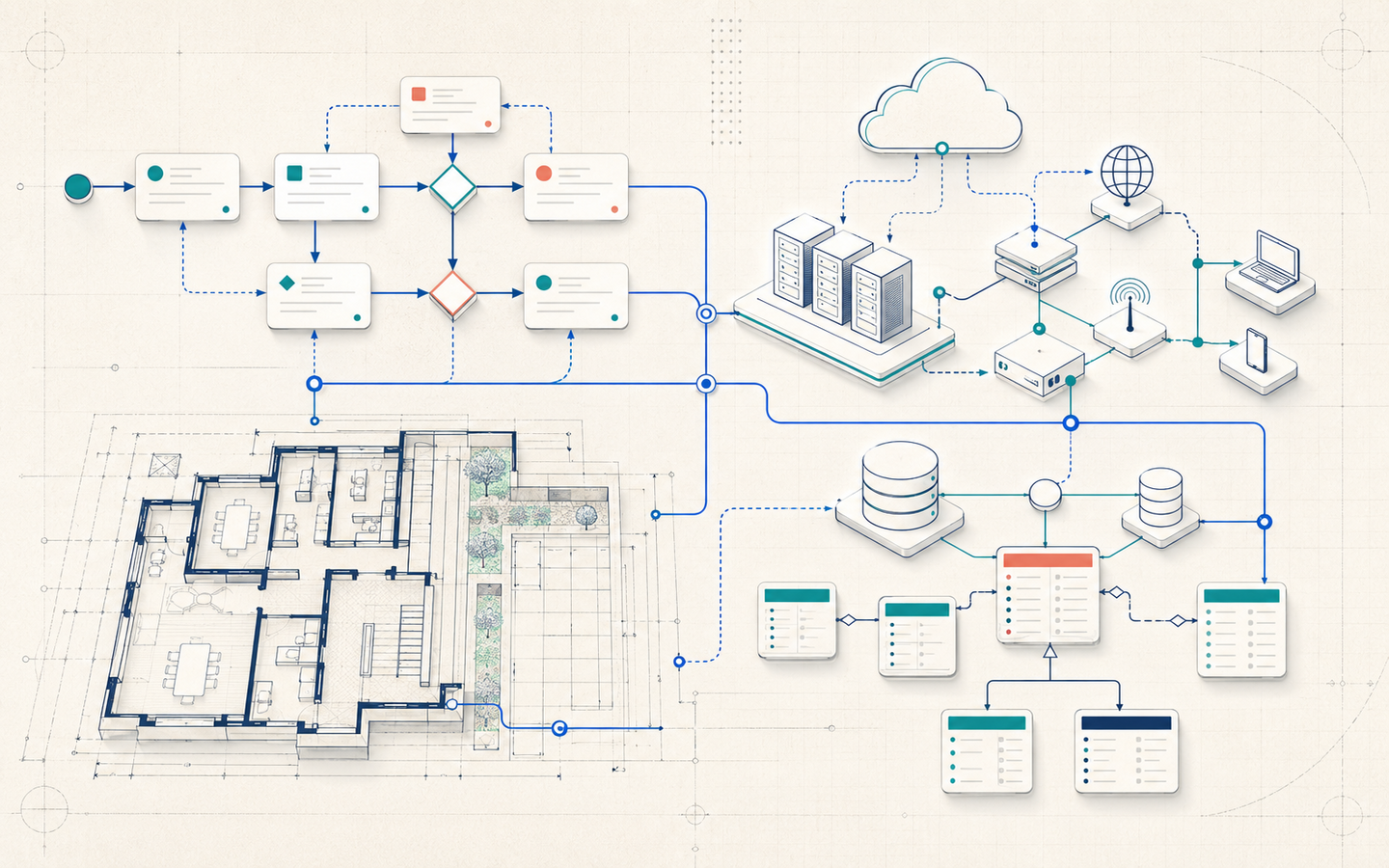
Bring the whole system into view.
Start with a professional template, build with intelligent shapes and connectors, then add the information that turns a static drawing into a working business artefact.
- Advanced process, technical and facility templates
- Reusable shapes, stencils, layers and containers
- Data graphics that reveal status and change
- Standards support and structured validation
A deep professional toolkit
What can you create with Visio Professional 2024?
From a leadership workshop to a data centre, application stack or industrial facility, Professional provides the visual building blocks for specialised work.
Business & process
- Basic and cross-functional flowcharts
- BPMN process models
- Value stream and Six Sigma maps
- ITIL, audit and decision diagrams

IT & cloud
- Detailed network topologies
- Azure and AWS architecture
- Rack, Active Directory and LDAP
- Kubernetes and enterprise systems
Software & data
- UML 2.5 and database models
- Entity-relationship diagrams
- Web and mobile wireframes
- Data-flow and program structures

Engineering
- Electrical and logic diagrams
- Piping and instrumentation
- Process-flow and fluid power
- Industrial controls and assemblies
Space & facilities
- Floor and office plans
- HVAC and plant layouts
- Security and access plans
- Telecom, plumbing and site plans
Planning & people
- Organisation charts
- Timelines and calendars
- Gantt and PERT charts
- Brainstorming and cause-and-effect
Intelligent editing
Keep complex diagrams organised as the work evolves
Visio Professional provides practical layout, structure and validation tools that reduce repetitive diagram maintenance.
Smart alignment
Use Auto Align, Auto Space, snap and Smart Guides to maintain clean spacing and visual order.
Connection-aware editing
Insert, remove or reposition shapes while keeping supported connectors and process flow understandable.
Layers and containers
Separate systems, group related objects and control how detailed information is presented.
Shape data
Attach descriptive or operational information to shapes so the diagram communicates more than appearance.
Diagram validation
Check supported structured diagrams against applicable rules and review identified issues.
Reusable stencils
Build custom shape libraries that reflect your organisation's systems, terminology and standards.
Data and collaboration
Add business context to every diagram
Visio Professional can link supported shapes to common data sources and display information through data graphics. Collaboration and online sharing capabilities depend on the services and permissions available to your organisation.


Supported data connections
Link diagrams to supported sources such as Excel, Access, SharePoint lists, SQL Server and compatible OLE DB or ODBC data.
Data graphics
Use colours, icons and indicators to make status, ownership, performance and exceptions easier to identify.
Comments and review
Add and respond to comments so reviewers can discuss the visual without changing its underlying structure.
Sharing requirements
OneDrive, SharePoint, Teams and other connected services may require separate licences, subscriptions and access permissions.
Data sources and connected Microsoft services are not automatically included with Visio Professional 2024. Availability depends on your environment, source system and permissions.
Professional standards
Make specialist diagrams easier to understand—and easier to trust.
Use standards-oriented content to improve consistency between teams, suppliers and stakeholders. Validate supported structured diagrams before they become process documentation.
Real work, clearly visualised
Designed for the people who explain how things fit together.
Visio Professional 2024 is at its best when precision matters and a visual must survive beyond the meeting where it was created.
IT & network teams
Document infrastructure, cloud architecture, racks, identity systems and service dependencies.
Business analysts
Model current-state and future-state processes, ownership, decisions, risks and improvements.
Software architects
Explain applications, interfaces, data models, UML structures and deployment patterns.
Engineers
Produce electrical, process, instrumentation and system diagrams with specialist stencils.
Facilities teams
Plan offices, security zones, services, equipment and space with scaled visual layouts.
Project leaders
Turn schedules, responsibilities, milestones and stakeholder relationships into accessible visuals.
HR & operations
Generate organisation charts and communicate reporting lines, roles and operational structures.
Consultants & educators
Create clear visual explanations for workshops, proposals, training and documentation.
Choose with confidence
Standard, Professional or subscription?
The best value comes from choosing the capability and payment model you will actually use.
Edition comparison
Visio Standard 2024 or Professional 2024?
Standard covers everyday business diagrams. Professional adds specialist diagram types, standards support, data tools and validation for more demanding work.
Visio Standard 2024
A practical choice for general business and personal diagramming.
- ✓ Flowcharts and business diagrams
- ✓ Organisation charts
- ✓ Timelines, schedules and basic networks
- ✓ Core templates, shapes and connectors
Visio Professional 2024
Includes general diagramming plus advanced technical and data-oriented capabilities.
- ✓ BPMN, UML and advanced process content
- ✓ Engineering, software and database diagrams
- ✓ Detailed networks, cloud and facility layouts
- ✓ Shape-to-data linking and data graphics
- ✓ Supported diagram validation
One-time purchase
Visio Professional 2024
Versioned Windows desktop application with professional diagrams and data linking.
- Pay once for this version
- Use locally on the licensed PC
- No continuous feature stream
- Confirm exact device entitlement
Per-user subscription
Visio Plan 2
Web and always-current desktop apps with multi-PC installation.
- Recurring per-user payment
- Desktop app on up to five PCs per user
- Continuous feature updates
- Additional web and cloud features
Basic browser access
Visio Plan 1
Browser-based diagramming without the full desktop application.
- Recurring per-user payment
- Web app experience
- Premium web templates
- Good for lighter diagramming
Upgrade perspective
What changes when you move to Visio 2024?
The value of upgrading depends on your current version, Windows environment and need for current support. Visio 2024 is a versioned purchase, not an automatic entitlement to future major releases.
Answers before you buy
Microsoft Visio Professional 2024 FAQs
Straight answers about licensing, compatibility, professional features, delivery and support.
It is Microsoft’s advanced Windows desktop diagramming edition for business, process, software, network, engineering, facility and data-linked diagrams. It includes the capabilities of Standard plus specialist templates, data tools and professional diagram types.
Visio Professional 2024 is supplied as a one-time-purchase edition rather than a monthly Visio Plan subscription. The licence type may be Retail, OEM or MAK according to stock, and the selected option determines the permitted device count.
A one-time-purchase edition provides ongoing use of that purchased version under its licence terms. It does not include automatic entitlement to future major versions or the continuous feature additions supplied with a subscription.
Every order may be supplied as Retail, OEM or MAK according to available stock. The selected option and invoice state the permitted device count.
Visio Professional is designed for professional and organisational diagramming. Your right to use a particular copy is governed by the licence terms attached to the exact product supplied.
Yes. Check processor architecture, storage, Office compatibility and organisational deployment policies before ordering.
Use a Microsoft-supported operating system and confirm your Windows edition before ordering. Windows 11 is the recommended current client platform.
No. Visio Professional 2024 is a Windows desktop product. Mac users need an appropriately licensed Windows environment or should consider a browser-based Visio plan.
Often yes, but compatibility depends on version, architecture and update channel. Microsoft documents that Microsoft 365 Apps must be Version 2408 or later for compatibility with Visio 2024.
No. Microsoft requires installed Office, Project and Visio products on the same PC to use the same bit architecture.
Yes. Professional includes content for BPMN 2.0 process modelling and UML 2.5 software and system modelling.
Yes. Professional includes detailed network content and architecture shapes for Azure and AWS, with additional Azure and Kubernetes content in the 2024 release.
Yes. Professional provides specialist content for electrical, piping and instrumentation, process flow, fluid power, industrial controls, circuits, logic and related engineering work.
Yes. Professional includes floor plans, office and space layouts, HVAC, plant layouts, security and access, electrical, telecom, plumbing and site planning.
Visio Professional supports links to common internal and external data sources. The source application, service, permissions or subscription may be required separately.
Yes. Visio can generate organisation charts from supported sources such as Excel, Exchange directories or Microsoft Entra ID, subject to required services and access.
The Professional product page lists DWG import capability. Confirm the specific AutoCAD workflow and file-version requirement for your project before purchase.
It can open many earlier Visio files. Older drawings may open in compatibility mode, and conversion to the current XML-based format can enable newer features.
Standard suits general flowcharts, schedules, basic networks and business diagrams. Professional adds engineering, software, database, cloud, facility, process-standard, data-linking and validation capabilities.
Professional 2024 is a versioned one-time-purchase desktop product. Plan 2 is a per-user subscription with web and always-current desktop apps, multi-PC rights and additional cloud-oriented features.
A versioned purchase receives applicable servicing and security updates, but not the continuous feature stream associated with Visio Plan 2.
Microsoft’s published lifecycle lists 10 October 2029 as the retirement date for Visio 2024 Professional and Standard.
Internet access is required for download, activation and connected experiences. Core desktop work can be used locally after successful installation, subject to licence requirements.
Account redemption and activation method depend on whether the supplied type is Retail, OEM or MAK. Follow the instructions included with the order.
Reinstallation, transfer and reactivation depend on whether the supplied type is Retail, OEM or MAK. Keep the order record and contact support before hardware changes or migration.
The offer can include compatibility guidance and help with the supplied download, installation and activation. Custom diagram design, account recovery, network administration and unrelated device faults are separate unless expressly included.
The product is digitally fulfilled using the delivery method stated at checkout. Orders may be checked before fulfilment to protect customers and payment security.
Check the order email address, spam folders and corporate filtering. Contact order support with the order reference—never publish a product key or account credentials.
Digital-product cancellation and refund rights depend on delivery or redemption status, applicable law and the store’s published policy. Review those terms before ordering.
No. Visio Professional 2024 is standalone diagramming software. Other Microsoft services may be required separately for connected workflows.
Ready when your PC is
Make complex work easier to see, share and improve.
Choose Microsoft Visio Professional 2024 when advanced diagrams, professional standards and data-driven visualisation are central to the work.
Verified reference links
Official Microsoft resources
Check current product, system, lifecycle and licensing information directly with Microsoft before deployment.
Microsoft documentation and lifecycle information may change. Review the current source for your environment and purchasing requirements.